Subscribers
Your subscribers are the people who’ve signed up at your kiosk. SubsTab uses double opt-in so every address on your list has genuinely agreed to hear from you.
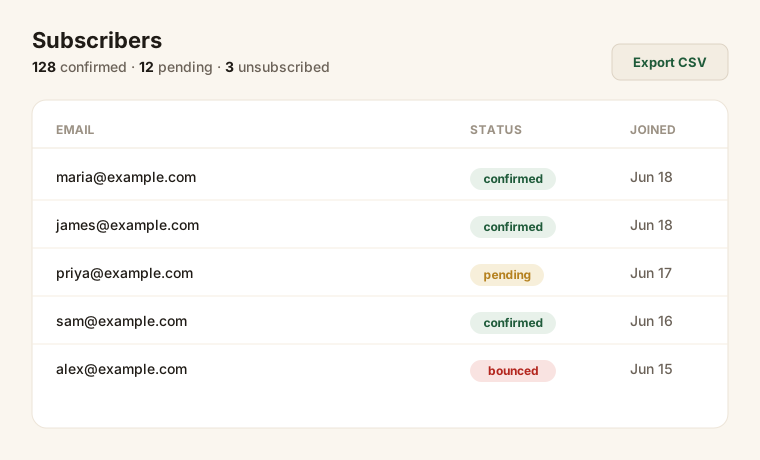
Statuses
Section titled “Statuses”| Status | Meaning |
|---|---|
| Pending | Signed up but hasn’t clicked the confirmation link yet. Not emailed campaigns. |
| Confirmed | Clicked confirm — a real, active subscriber. Campaigns go to these people. |
| Unsubscribed | Opted out. Never emailed again. |
| Bounced | Their address was undeliverable. Automatically excluded from sending. |
Only confirmed subscribers receive your campaigns.
Why double opt-in matters
Section titled “Why double opt-in matters”It costs you a step, but it’s worth it: a confirmed list has far fewer bounces and spam complaints, which keeps your emails landing in the inbox instead of the spam folder.
Already have a list?
Section titled “Already have a list?”You don’t have to start from zero. If you’ve collected emails in Mailchimp, Constant Contact, or a spreadsheet, you can bring them in from the Subscribers page — contacts your old tool already confirmed come in ready to email, and anyone who’d unsubscribed stays off your list. See Import your list.
Export your list
Section titled “Export your list”You can export your subscribers to a CSV at any time from the Subscribers page — handy for your records or for moving data.
Removing someone
Section titled “Removing someone”If a subscriber asks to be removed, they can use the unsubscribe link in any email, or you can handle a privacy request — see Compliance.