Campaigns
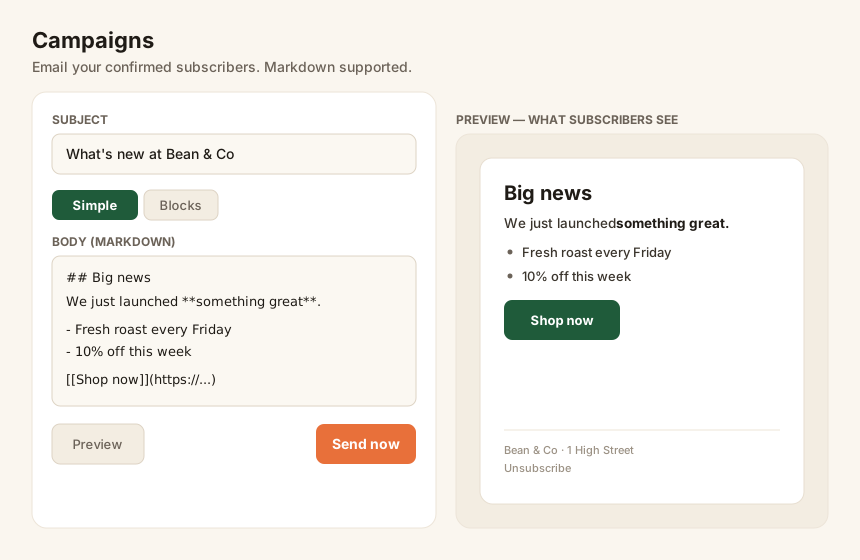
A campaign is an email you send to all your confirmed subscribers. You can write a quick note in Markdown or design something richer with blocks.
Write your campaign
Section titled “Write your campaign”Open Campaigns and choose a format:
- Simple (Markdown) — type a subject and body. Use the Formatting help for headings, bold/italic, lists, links, buttons, and images.
- Blocks — stack typed blocks (heading, text, image, button, divider) for a more designed layout without writing any code.
Add images
Section titled “Add images”Click Add image to upload a picture — it’s hosted for you and dropped into your email automatically. Images are resized and optimized so they load fast.
Preview before you send
Section titled “Preview before you send”Hit Preview to see exactly what subscribers will receive — your branding, the content, and the footer with your address and an unsubscribe link. The preview matches the real email.
When you’re happy, choose Send now. SubsTab emails every confirmed subscriber, then tracks opens and clicks so you can see how it did in the campaign report.
Sending limits
Section titled “Sending limits”Each plan includes a monthly email allowance. If a send would go over it, SubsTab pauses and resumes next month — you’ll never be charged a surprise. See Billing & plans.